How to automate TradingView Strategy Script
1. Setup the trading robot
The provided Strategy Script, has a section to setup the trading robot.
You will need to provide the following information depends on the platform you use.
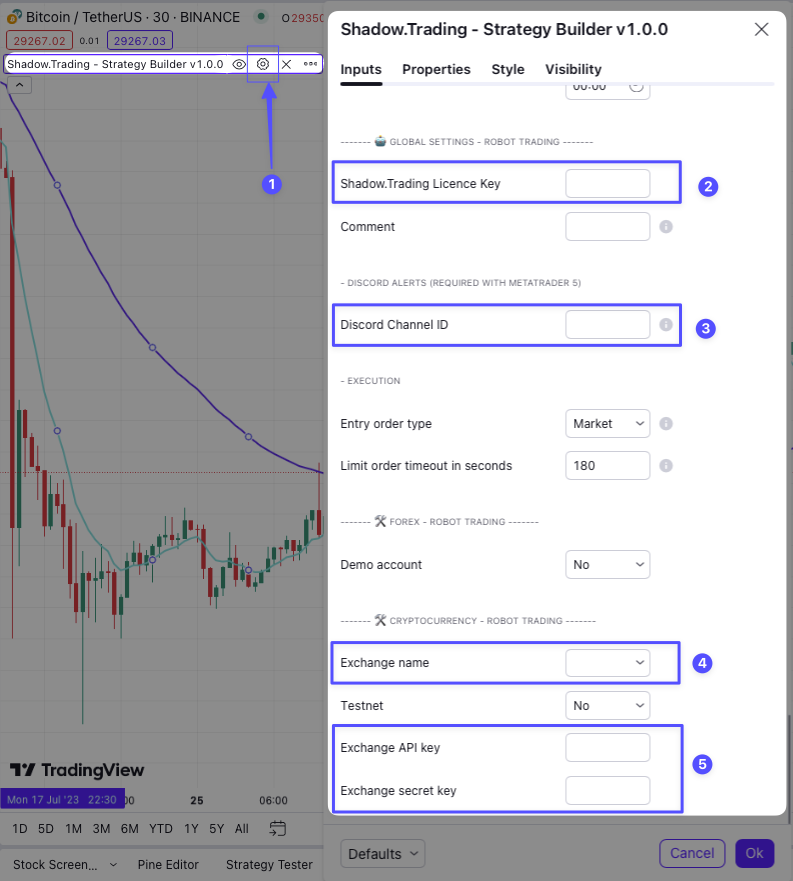
Metatrader 5
Make sure you have correctly setup Metatrader 5 and the Shadow.Trading Expert Advisor (EA) by following this step
In order to automate the strategy, you will need to provide the following information under the script settings:
- (2) Shadow.Trading License Key - You can find it in your account on https://www.shadow.trading/.
- (3) Discord Channel ID - From the First Step Quick Start Guide.
Bybit or Binance
In order to automate the strategy, you will need to provide the following information under the script settings:
- (2) Shadow.Trading License Key - You can find it in your account.
- (3) Discord Channel ID - From the First Step Quick Start Guide.
- (4) Exchange name - It can be Bybit Futures or Binance USD M
- (5) Exchange API Key - That you have setup during the previous step.
- (5) Exchange API Secret - That you have setup during the previous step.
2. Setup alerts with webhooks
You can now create alerts on the strategy script, and setup webhooks to receive notifications on your Discord channel.
On the following screenshot, you can find important steps information:
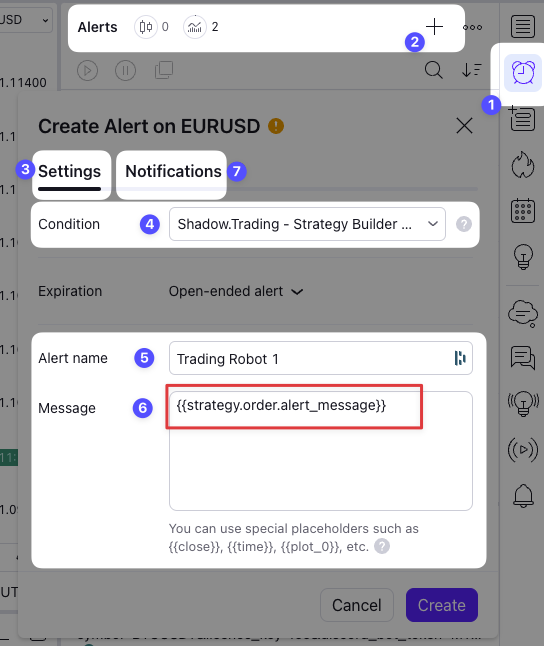
- 1 - Click on alert to show sidebar.
- 2 - Add new alert.
- 3 - Click on settings.
- 4 - Select Shadow.Trading - Strategy Builder Script, it matches the strategy you have setup on your current chart.
- 5 - Give a name to the alert.
- 6 - Under message, it is important to put the following code, it will send corresponding alert message to the webhook to open and close position when needed.
{{strategy.order.alert_message}}
- 7 - Click on Notifications to provide webhook url.
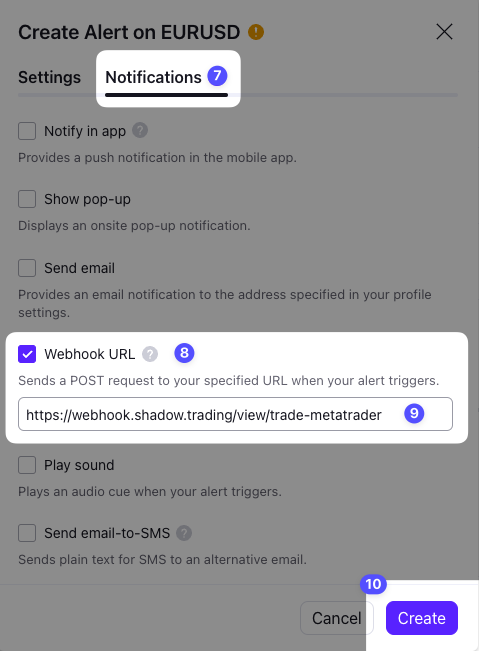
- 8 - Enable webhook URL by checking the box.
- 9 - Put the Trading connector API URL (not the same urls depends on the market).
For forex pairs with Metatrader 5
https://webhook.shadow.trading/view/trade-metatrader
For cryptocurrency pairs with Bybit or Binance
https://webhook.shadow.trading/view/trade-cryptocurrency
- 10 - Click on Create